
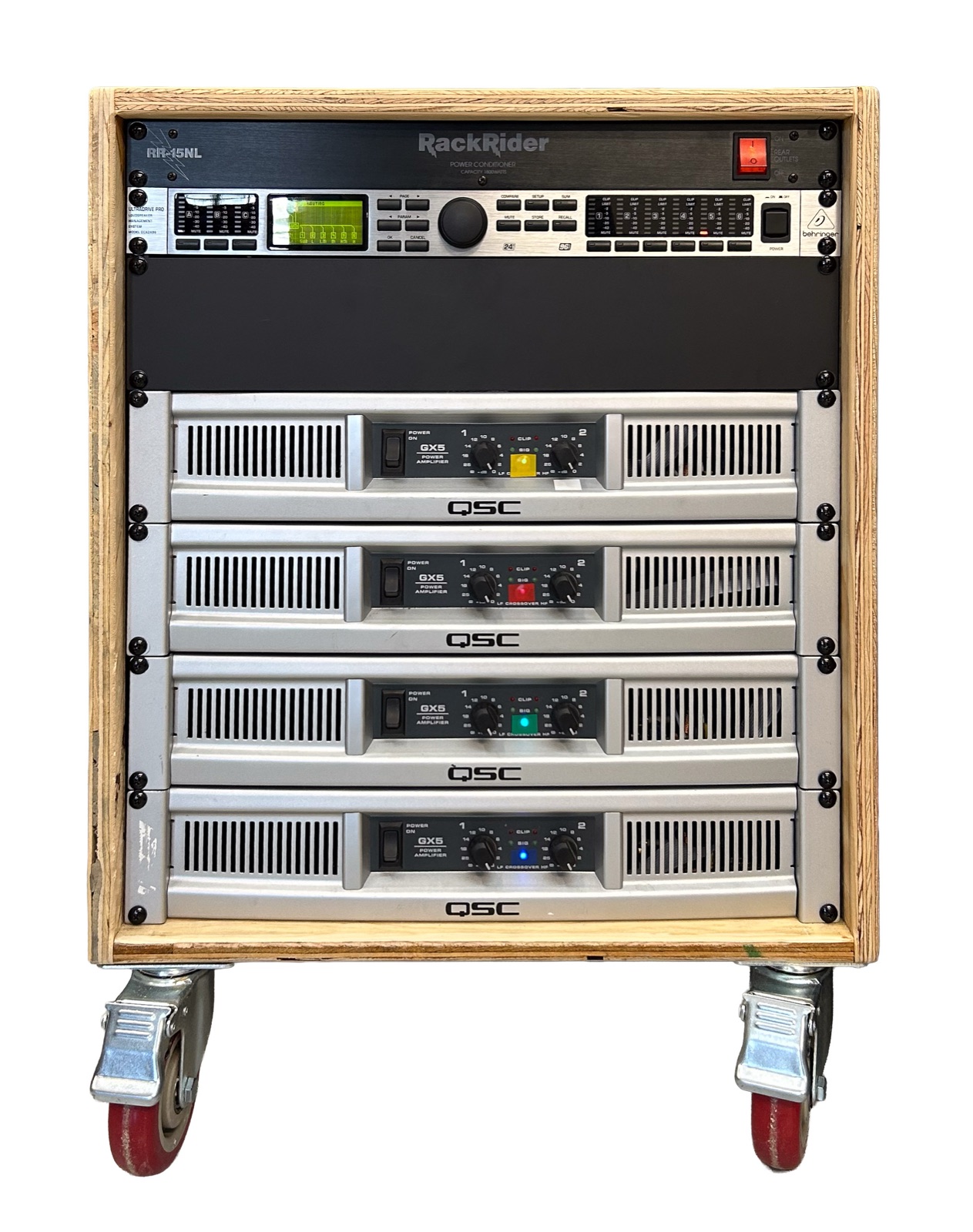
The amp rack holds everything between the mixer and the speakers: the Behringer DCX2496 crossover, four QSC GX5 amplifiers and a Furman Rack Rider power conditioner, in a 12U rack with closed sides, cooled by fans that pull air through the amps.
All amp gain knobs run FULLY UP. All level and limiting is done in the DCX, and every limiter threshold in Section 2 assumes the knobs are up.
Amps at the bottom, then a 2U solid blank to space the DCX from the amps, then the DCX and the power conditioner. Label each amp with its number and band.
Eight speaker runs: subs 2, scoops 2, kicks 2, mid 1, horn 1. All speaker cables have Speakons on both ends, and every speaker has a Speakon inlet. Amp outputs, cables and box inputs are color coded by band: subs blue, scoops green, kicks yellow, mid red, horn white.
| Amp | Ch | DCX out | Load | Color | Caps |
|---|---|---|---|---|---|
| GX5 #1 | A / B | 1 Subs | Sub 1 / Sub 2 | blue | recapped |
| GX5 #2 | A / B | 2 Scoops | Scoop 1 / 2 | green | recapped |
| GX5 #3 | A / B | 3 Kicks | Kick 1 / 2 | yellow | original |
| GX5 #4 | A | 4 Mid | mid horn | red | recapped |
| GX5 #4 | B | 6 Horn | 2440 + piezos | white | recapped |
We put the recapped amps where stress or risk is highest. #4 carries the 2440, the most fragile driver in the rig: a fault that puts DC on its output would destroy it at once. #2 drives the 2226H scoops at 465 W a channel, the heaviest load in the rig. #3 drives the EVM-15L kicks at 200 W, the lightest of the bass pairs, so it gets the amp with the original caps. (Before the October 2026 driver swap these two were the other way round; the amp numbers follow the band, so the units were swapped in the rack.)
Each pair (subs, scoops, kicks) is fed from one DCX output through an XLR Y-cable to the amp's A and B inputs. The horn feed passes through the inline -20 dB pad at GX5 #4 input B. Never run the horn without it (Section 7).
The GX5 moves air SIDEWAYS, not front to back: its fan blows left to right across a heatsink mounted sideways in the chassis. It breathes through the front grille and the left-side holes, and exhausts through the right of the front panel and the right-side perforations.
The rack is sealed: closed sides, a solid rear panel, solid blanks. The only way out is the fan strip at the top of the rear panel. The fans hold the inside of the rack below room pressure, so every amp draws fresh room air in through its front grille, and the amps' exhaust is pulled into the rack and out through the fans. No hot air loops back out of the front.
Four fans, 100 CFM total, on a 2U strip at the TOP of the rear panel, blowing OUT. The thermostat is BYPASSED: the fans run whenever the rack has power. Powered by their own AC adapter from the Rack Rider.
Each amp's own fan is voltage-controlled: slow at idle (about 11 V), up to about 30 V when hot. An amp fan that does not spin up under load means the amp is cooking its caps, and heat is what killed the original ones.
Everything runs from one power cord through the Rack Rider RR-15NL (15 A breaker). The current below is from QSC's own table for the GX5 (8 + 8 ohm, 120 V), scaled to the DCX limits, so it is an estimate.
Normal loud use sits well inside 15 A. Long stretches with the limiters pinned can trip the breaker. GX5 #2 (scoops, 465 W a channel) draws the most. If the breaker trips, move #2 to a second wall circuit.
Put the rack on a wall circuit of its own where you can; at least, nothing else heavy on it.
The DCX setting MUTE OUTS WHEN POWER ON keeps all outputs muted at power-up. Leave it on.
Trey at Syntron recapped three of the GX5s in October 2026. The four main filter caps (Nover 12000 uF / 63 V) ran at about 62 V on a 63 V rating, right beside the heatsink. In two amps they had vented and in one they had bulged. Trey replaced them with Nichicon LLS1K103MELC, 10000 uF / 80 V, and cleaned and reused the fans.
Red CLIP LED flashing means the amp is overdriven; GuardRail reduces gain to limit the distortion. With the DCX limiters set by Section 2 this should not happen. If CLIP stays on with the limiters set, check the cable and the speaker.